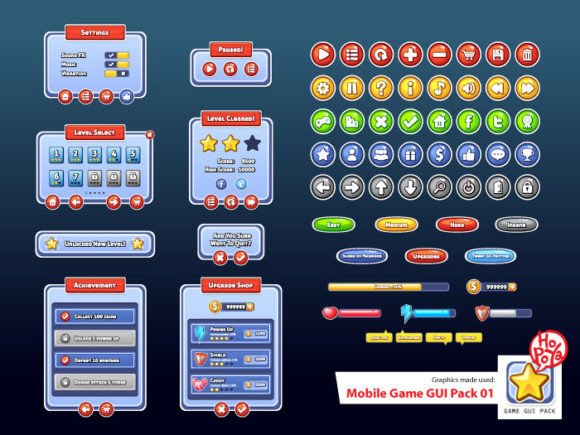
Mobile Game GUI Pack 01: A Complete UI Toolkit for Developers
In the competitive world of mobile gaming, first impressions are rarely made by the story alone—they are made by the interface. Before a player even engages with the mechanics, they judge the game based on its menus, buttons, and heads-up display (HUD). This is where the Mobile Game GUI Pack 01 steps in as a vital resource. It is not just a collection of images; it is a comprehensive graphical user interface toolkit designed to bridge the gap between a raw game engine and a polished, professional product. For indie developers, small studios, and hobbyists, this pack offers the visual consistency required to compete in today’s crowded app stores.
The Anatomy of a Versatile Interface
What makes the Mobile Game GUI Pack 01 particularly useful is its blend of quantity and flexibility. The pack includes over 40 customizable buttons, which serves as the foundation for any game’s interactivity. However, the true value lies in the five distinct color variations provided for these elements. In UI design, color psychology plays a massive role in user experience (UX). By offering multiple palettes, this asset pack allows creators to shift the mood of their game instantly. Whether you are building a high-energy arcade shooter that demands neon contrasts or a casual puzzle game that requires softer, pastel tones, the raw materials are already there.
Beyond the buttons, the inclusion of customizable windows and game elements ensures that the visual language remains consistent. Nothing breaks immersion faster than a menu screen that looks like it belongs to a different software than the gameplay HUD. With the Mobile Game GUI Pack 01, the windows for inventory, settings, and dialogue share the same design DNA as the health bars and score counters. This cohesion is a hallmark of professional graphic design and is essential for establishing a strong brand identity within the game itself.
Vector Precision and Production Flexibility
One of the most significant technical advantages of this collection is the file format. The pack includes vector AI (CS) and EPS 10 files. For those unfamiliar with modern typography and asset management, vector files are the gold standard. Unlike raster images (like standard JPEGs), vector graphics can be scaled to any size without losing clarity. This is crucial for mobile development, where screen resolutions vary wildly between a budget Android phone and a high-end iPad Pro.
Furthermore, the inclusion of transparent PNG files offers immediate utility for developers who may not have access to advanced vector editing software like Adobe Illustrator. This dual-format approach makes the Mobile Game GUI Pack 01 accessible to a wider audience. Whether you are a seasoned graphic designer tweaking anchor points or a hobbyist developer dragging and dropping assets into Unity or Godot, the workflow is streamlined. This practical approach to file delivery saves hours of production time, allowing creators to focus on gameplay mechanics rather than pixel-pushing.
Typography as a Core Design Element
A GUI is more than just shapes and colors; it is defined by its text. The Mobile Game GUI Pack 01 utilizes the Aller Display font, a choice that speaks volumes about the pack's intended versatility. Aller Display is a sans serif font known for its distinct personality and excellent readability at larger sizes. Unlike generic system fonts, this typeface has character. It is a display font, meaning it is engineered to grab attention, making it perfect for headers, main menus, and logo designs.
However, using a display font effectively requires understanding its strengths. Aller Display works best when used for headlines and short bursts of text where impact is necessary. For body text, such as item descriptions or lore entries, you will likely want to pair it with a more neutral sans serif font or even a clean serif font to ensure readability on smaller screens. This practice, known as font pairing, is essential for creating a balanced visual hierarchy. The bold nature of Aller Display helps guide the player's eye to the most important information first, enhancing the overall user experience.
Practical Applications and Design Strategy
When integrating the Mobile Game GUI Pack 01 into your project, think beyond the immediate technical requirements. Consider the psychological impact of your UI design. The clean lines and customizable nature of these assets make them suitable for a variety of genres. For example:
- Casual Games: Use the softer color palettes and rounded window elements to create a welcoming, non-intimidating environment. The creative font style of Aller Display adds a friendly touch without being childish.
- Strategy or RPG Games: Utilize the darker window frames to create a sense of depth and seriousness. The scalability of the vector assets allows you to create complex inventory systems without visual clutter.
- Hyper-casual Games: The high-contrast buttons are perfect for fast-paced gameplay where players need to tap instantly. The clarity of the sans serif font ensures that instructions are read in a split second.
For entrepreneurs and small business owners venturing into gamification for marketing, this pack offers a quick way to prototype interactive content. Instead of commissioning expensive custom art from scratch, you can use this premium font and asset pack to build a playable demo or a branded mini-game for social media engagement. The professionalism of the assets helps build trust with your audience, signaling that your brand cares about quality.
Optimizing Your Workflow
To get the most out of the Mobile Game GUI Pack 01, a strategic approach to implementation is necessary. Do not simply import every asset into your project at once. Instead, curate a specific style guide for your game. Select two or three primary colors from the five available options and stick to them. This restraint creates a cleaner, more professional look.
Additionally, pay close attention to the readability of the Aller Display font against your background elements. While the font is designed for legibility, poor contrast can ruin the effect. Test your text overlays on both light and dark backgrounds to ensure compliance with accessibility standards. Remember, a beautiful interface is useless if the player cannot read the "Start" button.
Finally, treat the provided vector files as your "source of truth." Always keep a master copy of the AI or EPS files untouched. Make your color changes and resizing in these vector programs before exporting to PNG. This ensures that you always have a crisp, high-resolution version to fall back on if you decide to change your game's resolution or platform later. By leveraging the full potential of the Mobile Game GUI Pack 01, you are not just decorating a game; you are crafting an experience.